External data access
An external job can call D.Hub data query APIs with a service-account access token and save the returned data to a file or external database. Download an entire dataset or use SQL to retrieve only the required rows.
D.Hub does not push data changes to an external database or provide change events. Running the query job at short intervals can reduce delay but does not guarantee real-time delivery.
Prepare access
- Under Service accounts, create an account dedicated to the external integration and issue an Access token.
- Under Sharing and Permissions for the target dataset, select the service account and grant the Viewer role. Granting Viewer on the collection also gives the service account inherited read access to its child datasets.
- Copy the dataset ID from its Overview tab.
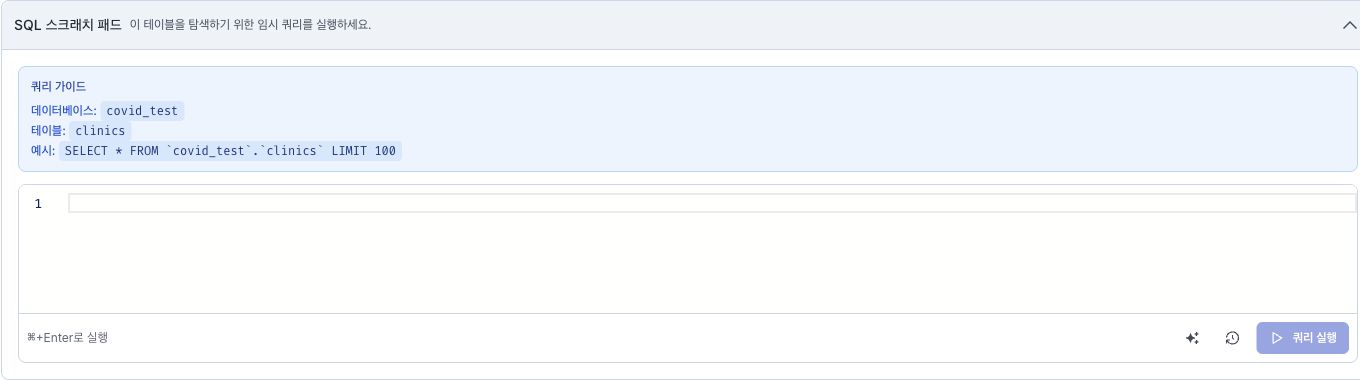
- For a SQL query, open Query guide on the dataset's Data tab and review the Database, Table, and Example values.
- Store the D.Hub API base URL, dataset ID, and access token in the external job's configuration and secret store.
The following shell setup keeps the token out of command history. In an automated environment, inject the same values from a CI/CD or job-scheduler secret store.
export DHUB_API_BASE_URL="https://{host}/api/v1"
export DHUB_DATASET_ID="{dataset_id}"
read -rsp "D.Hub access token: " DHUB_ACCESS_TOKEN
export DHUB_ACCESS_TOKEN
echo
Choose a query API
| Goal | API | Primary options |
|---|---|---|
| Download all data or a limited set of rows as a file or JSON | Get Table — GET /datasets/{table_id}/table | format, limit, version |
| Retrieve selected columns, filtered or sorted rows, or aggregate results | Run Analytics Query — POST /analytics/query | Body kind, source_id, query, max_rows |
Get Table supports csv, json, parquet, and arrow. Omitting limit returns the full dataset, so start with a small value to check response size and processing time. Use version only to retrieve a data version shown under Version history for a versioned dataset.
Run Analytics Query accepts the same SELECT statements as the dataset's Data tab. Set kind in the body to dataset and specify the dataset ID in source_id. max_rows restricts the number of returned rows; the default is 100 and the maximum is 1000. Results are returned only as a JSON array of rows, and no cursor for the next page is created.
Download a dataset
cURL
The following request returns up to 100 rows from the current data as a JSON array.
curl --fail-with-body --silent --show-error \
  -H "Authorization: Bearer ${DHUB_ACCESS_TOKEN}" \
  "${DHUB_API_BASE_URL}/datasets/${DHUB_DATASET_ID}/table?format=json&limit=100"
To save a file, match the format value to the output filename extension.
curl --fail-with-body --silent --show-error \
  -H "Authorization: Bearer ${DHUB_ACCESS_TOKEN}" \
  "${DHUB_API_BASE_URL}/datasets/${DHUB_DATASET_ID}/table?format=parquet" \
  --output dataset.parquet
Python
import os

import requests

base_url = os.environ["DHUB_API_BASE_URL"]
dataset_id = os.environ["DHUB_DATASET_ID"]
token = os.environ["DHUB_ACCESS_TOKEN"]

response = requests.get(
    f"{base_url}/datasets/{dataset_id}/table",
    headers={"Authorization": f"Bearer {token}"},
    params={"format": "json", "limit": 100},
    timeout=60,
)
response.raise_for_status()
rows = response.json()
Confirm that the response status indicates success, and compare the number of returned rows and the columns with the dataset preview. If you downloaded a file format, reopen the file and check its schema and row count.
Query only the required rows with SQL
The following example retrieves up to 1,000 rows changed since updated_at, ordered from oldest to newest. Replace {database}, {table}, column names, and the reference time for the target dataset.
cURL
QUERY="SELECT id, updated_at, value
FROM \`{database}\`.\`{table}\`
WHERE updated_at >= '2026-07-24T00:00:00Z'
ORDER BY updated_at, id"

jq -n --arg source_id "${DHUB_DATASET_ID}" --arg query "${QUERY}" \
  '{kind: "dataset", source_id: $source_id, query: $query, max_rows: 1000}' | \
curl --fail-with-body --silent --show-error \
  -X POST \
  -H "Authorization: Bearer ${DHUB_ACCESS_TOKEN}" \
  -H "Content-Type: application/json" \
  --data-binary @- \
  "${DHUB_API_BASE_URL}/analytics/query"
Python
query = """
SELECT id, updated_at, value
FROM `{database}`.`{table}`
WHERE updated_at >= '2026-07-24T00:00:00Z'
ORDER BY updated_at, id
"""

response = requests.post(
    f"{base_url}/analytics/query",
    headers={"Authorization": f"Bearer {token}"},
    json={
        "kind": "dataset",
        "source_id": dataset_id,
        "query": query,
        "max_rows": 1000,
    },
    timeout=60,
)
response.raise_for_status()
rows = response.json()["rows"]
The source_id in the body and the database and table in the SQL statement must refer to the same dataset. Use the values shown under Query guide on the dataset's Data tab, and run only SELECT statements.
Before automating the query, run it with a small max_rows to confirm that the sort order and watermark columns are returned as expected.
Periodically write data to an external database
Run an external job on a schedule to call the API and write the results to the target database.
- Load the watermark from the last successful run. In most cases, use a modification timestamp together with a unique ID.
- Use
Run Analytics Queryto retrieve rows after the watermark in a stable order. You can overlap the previous range slightly to avoid missing rows with the same timestamp. - Upsert rows into the target database by a stable key. Use
INSERT ... ON CONFLICTfor PostgreSQL,INSERT ... ON DUPLICATE KEY UPDATEfor MySQL, or an equivalentMERGEoperation for another database. - After the target database transaction commits, store the greatest modification timestamp and ID as the new watermark.
- If
truncatedin the response istrue, use the final row as the next starting point and continue with another batch.
If a job fails partway through, query again from the existing watermark. Define the upsert key and update rules so duplicate input produces the same result. Use exponential backoff for API retries, and do not advance the watermark before the target database transaction commits.
- If a dataset has no reliable modification timestamp or increasing key, changed rows cannot be identified independently. Retrieve and compare the full snapshot instead.
- The query APIs do not provide deletion events or a shared change cursor. To propagate deletions, add a deletion-status column to the source or run a periodic full comparison.
- A short interval reduces delay but does not guarantee real-time delivery, which also depends on network, API processing, and target-database commit time.
Handle errors and tokens
| Symptom | Check |
|---|---|
401 Unauthorized | The Bearer prefix and whether the token is expired or revoked |
403 Forbidden | At least Viewer permission for the service account on the dataset and access to required markings |
404 Dataset not found | Whether the ID was copied from the dataset's Overview tab |
| SQL or request-format error | The database and table in Query guide, the SELECT statement, and the JSON query field |
| Slow response or insufficient memory | Reduce max_rows and split the range with a watermark and stable key |
Do not write the token to source code, logs, or job output. When rotating a token, update the external job with the new token and confirm a successful call before revoking the old token. See Error handling for status codes and the shared response format.
Next steps
- Service accounts — Issue, rotate, and revoke access tokens for an external integration account.
- Sharing permissions — Review Viewer roles and permission inheritance for collections and datasets.
- SQL reference — Review the supported ClickHouse SQL for dataset queries.